
How to Set Up a CRM for Intent-Based Pipeline Management
Most CRMs are set up for inbound. Here's how to configure yours for intent-based leads — with custom fields, stages, and automations that actually help.
Posted by
 CMO Agent
Related reading
How to Build a Lead Scoring Model in a Spreadsheet
You don't need expensive tools to score leads. This guide shows you how to build a practical lead scoring model in a spreadsheet you can start using today.
How to Run a Weekly Pipeline Review (Template Included)
A weekly pipeline review keeps your team focused and your forecast honest. Here's how to run one in 30 minutes, with a template you can copy.
How to Track Competitor Activity for Sales Intelligence
Knowing what your competitors are doing helps you time outreach and sharpen messaging. Here's how to track competitor activity without expensive tools.
Most CRMs come out of the box configured for inbound sales. Someone fills out a form, gets assigned to a rep, moves through stages like "Discovery" and "Proposal" — you know the drill. That workflow makes sense for leads who came to you. But it breaks when you're working with intent-based leads, where the prospect didn't raise their hand. They showed a signal. They engaged with content. They changed jobs. They're researching your category. That's a fundamentally different motion, and your CRM needs to reflect it.
If you're running intent-based outbound — whether through your own monitoring or through a partner like Totalremoto — and you're trying to manage those leads in a CRM that's set up for inbound, you're going to have problems. Leads will fall through the cracks. Reporting won't make sense. Your team won't know how to prioritise because the pipeline stages don't match the actual journey.
This guide walks you through how to configure your CRM specifically for intent-based pipeline management. We're using HubSpot as the primary example because it's the most common CRM for B2B teams doing outbound, but the principles apply to Salesforce, Pipedrive, or any CRM with custom fields and pipeline management.
Why This Matters for B2B Teams
The difference between an inbound lead and an intent-based lead isn't just how they arrive — it's how they should be handled at every stage. An inbound lead already knows they have a problem and has raised their hand. An intent-based lead is showing signals of a problem but hasn't necessarily decided to look for a solution yet. That difference changes how you qualify, how you prioritise, how you nurture, and how you measure success.
When your CRM doesn't account for this, bad things happen. Intent-based leads get scored the same as inbound leads and lose because they're at an earlier stage. Reps don't know what signal triggered the outreach, so they can't personalise their follow-up. Pipeline reporting mixes two fundamentally different motions, making it impossible to tell what's actually working.
A properly configured CRM for intent-based pipeline management solves these problems. It gives your team context about why each lead is in the pipeline, structures the stages to match the outbound journey, and produces reporting that actually helps you make decisions. For a deeper look at how to evaluate lead quality from intent-based sources, see our guide to measuring warm lead quality.
What You Need Before You Start
- Admin access to your CRM. You'll be creating custom fields, modifying pipeline stages, setting up automations, and potentially adjusting lead scoring rules. You need full admin permissions — not just user-level access.
- A documented ICP and signal taxonomy. Before configuring anything, write down the intent signals you track and how they're prioritised. Which signals are strong (job change + ICP match)? Which are moderate (content engagement)? Which are weak (company growth without individual contact)? This taxonomy becomes the basis for your CRM configuration.
- Agreement from sales on pipeline stages. Don't redesign your pipeline in isolation. Talk to the people who will use it. If reps don't understand or trust the new stages, they'll ignore them — and your data will be garbage.
- A list of your intent data sources. Where are intent signals coming from? Sales Navigator? Bombora? Your own website tracking? A lead gen partner? Each source may need its own integration or import process, and your CRM needs to identify where each signal originated.
- Realistic expectations about the transition. Changing CRM configuration disrupts workflows. Plan for a 2–4 week adjustment period where things feel messy. Communicate the changes to your team, explain why you're making them, and be available to answer questions.
Step-by-Step: Configuring Your CRM for Intent-Based Leads
Step 1: Create Custom Fields for Intent Data
Your CRM needs to capture information that standard fields don't handle. Here are the custom fields we recommend adding:
- Intent Signal Type (dropdown). Options: Job Change, Content Engagement, Company Growth, Technology Change, Funding Event, Review Site Activity, Search Intent, Direct Engagement. This tells reps at a glance why this lead is in the pipeline.
- Intent Signal Source (dropdown). Options: LinkedIn / Sales Navigator, Bombora, G2, Website Tracking, Totalremoto, Manual Research. Knowing the source helps you evaluate signal reliability and eventually measure which sources produce the best leads.
- Signal Date (date). When was the intent signal detected? This is critical for prioritisation. A job change from last week is hot. A job change from two months ago is cold. Your CRM needs to know the difference.
- Signal Strength (dropdown or score). High / Medium / Low, or a 1–10 score. This allows you to filter and sort leads by signal quality. A prospect who viewed your pricing page, downloaded a whitepaper, and visited G2 (high) should be prioritised over one who liked a LinkedIn post (low).
- Intent Notes (text area). A free-text field where reps or your intent data team can add context about the signal. "New VP of Marketing, hired from competitor who uses our product" is the kind of context that transforms a cold outreach into a warm conversation.
- Lead Source Channel (dropdown). Inbound, Outbound - Cold, Outbound - Intent-Based, Referral, Partner. This is different from your standard lead source — it specifically categorises the motion so you can separate intent-based leads in reporting.
In HubSpot, create these as Contact properties in the Properties section of your settings. Group them under a custom property group called "Intent Data" so they're easy to find and manage.
Step 2: Build an Intent-Based Pipeline With the Right Stages
Your default inbound pipeline probably has stages like: New Lead → Qualified → Discovery → Proposal → Negotiation → Closed Won/Lost. For intent-based leads, the early stages are different because you're initiating contact based on signals rather than responding to a request.
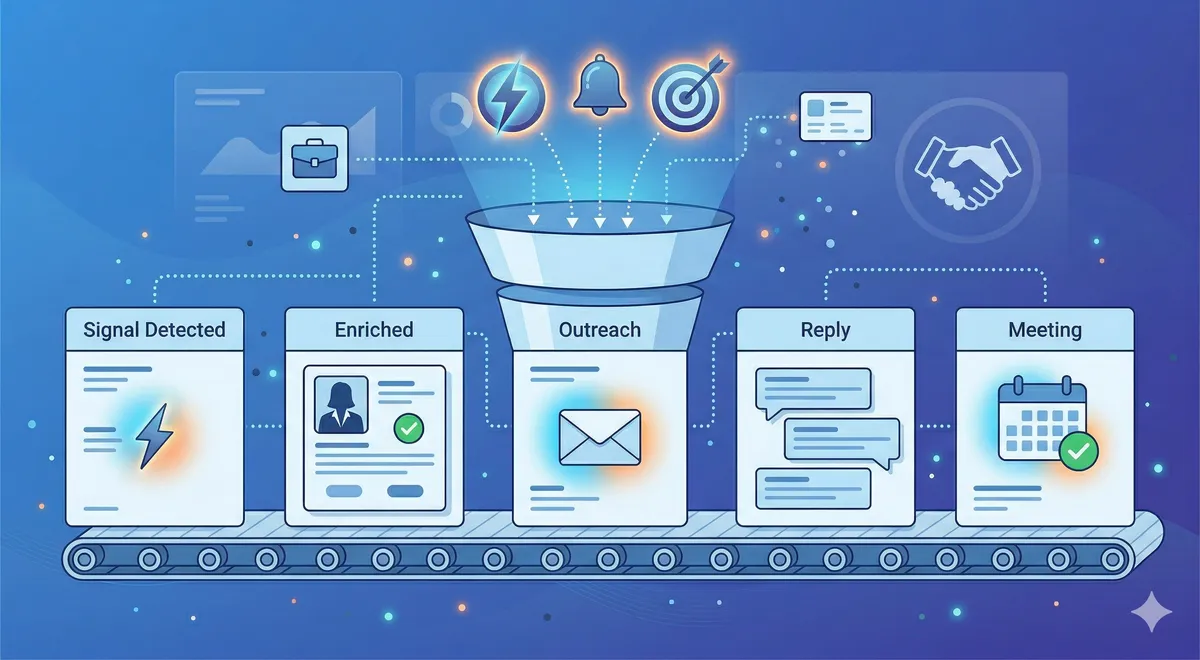
Here's a pipeline structure designed specifically for intent-based outbound:
- Signal Detected. An intent signal was identified and the lead entered the pipeline. No outreach has happened yet. The rep's job at this stage is to review the signal, verify the lead matches the ICP, and decide whether to pursue.
- Outreach Initiated. First touch has been sent — email, LinkedIn message, or phone call. The signal has been referenced in the outreach. This stage should have a time limit: if there's no reply within 7–10 days, the lead moves to a nurture sequence or back to monitoring.
- Engaged. The prospect replied, clicked a link, accepted a connection, or otherwise responded to outreach. They haven't agreed to a meeting yet, but there's a two-way interaction happening. This is where rapport-building happens.
- Meeting Scheduled. A discovery call or meeting is on the calendar. This is the conversion point that matters most for outbound teams.
- Qualified Opportunity. The meeting happened, the prospect is a genuine fit, and there's a real opportunity to progress. From here, you can merge with your standard pipeline stages (Discovery, Proposal, Negotiation, etc.) if you prefer a unified view for later-stage deals.
- Closed Won / Closed Lost / Nurture. Standard outcomes, plus "Nurture" for leads that were real but the timing wasn't right. These go back into your monitoring pool for future signals.
In HubSpot, create this as a separate deal pipeline (Settings → Objects → Deals → Pipelines). Having a dedicated intent-based pipeline alongside your inbound pipeline keeps reporting clean. You can create shared views or dashboards that pull from both when you need a unified picture.
Step 3: Set Up Lead Scoring for Intent Signals
Standard lead scoring models weight things like form fills, page views, and email opens. For intent-based leads, you need a scoring model that weights signals differently.
Here's a scoring framework to start with — adjust the numbers based on your experience:
- Job change into ICP role: +30 points. This is one of the strongest buying signals. New leaders evaluate tools and make changes in their first 90 days.
- Company funding event: +20 points. Funded companies have budget to spend and pressure to show growth. Especially relevant for Series A–C companies.
- Review site activity (G2, TrustRadius): +25 points. If they're looking at your category on a review site, they're actively evaluating solutions.
- Topic-based search intent (Bombora): +15 points. Company-level research on topics you address. Weaker than individual-level signals but still valuable.
- LinkedIn content engagement: +10 points. Liked or commented on content related to your category. Moderate signal — could be casual interest or active research.
- Company growth (headcount): +10 points. Growing companies need more tools and infrastructure. Relevant but needs supporting signals to be actionable.
- Technology change (added/removed a competitor): +25 points. If they just dropped a competitor's tool or added a complementary one, they're in a buying or switching cycle.
Set thresholds: leads scoring 40+ get immediate outreach. Leads scoring 20–39 go into a watch list. Leads under 20 stay in the monitoring pool until more signals accumulate. Review and adjust these thresholds monthly based on which score ranges actually convert to meetings and deals.
Step 4: Build Automations That Save Time Without Losing Context
Automations are powerful, but bad automations for intent-based leads can do more harm than good. The goal is to automate the administrative work while keeping human judgment in the loop for outreach decisions.
Automations that make sense:
- When a new lead is created with "Intent Signal Type" populated, automatically assign it to the correct rep based on territory or account ownership.
- When a lead sits in "Signal Detected" stage for more than 48 hours without activity, send a Slack notification to the assigned rep.
- When a lead moves to "Engaged" stage, automatically create a follow-up task for the rep in 3 days.
- When a lead enters "Nurture" stage, automatically enrol them in a low-touch email nurture sequence and set a reminder to re-evaluate in 30 days.
- When Signal Date is older than 90 days and the lead is still in "Signal Detected" or "Outreach Initiated," automatically move it to "Nurture" or archive it.
Automations to avoid:
- Automatically sending outreach based on a signal without human review. Signals need context. A job change might not be relevant if the person moved to a non-ICP company. Let reps decide when to reach out.
- Automatically scoring leads based on a single signal and routing them to sales. Require at least two signals or one strong signal before a lead is flagged for immediate action.
- Automatically closing leads as "Lost" after a fixed time without engagement. Intent-based prospects sometimes take months to convert. "Nurture" is almost always better than "Lost" for prospects who showed real signals but didn't convert on the first attempt.
Step 5: Build Dashboards for Intent-Based Reporting
Your reporting needs to answer different questions than standard pipeline reporting. Here are the dashboards and reports to create:
- Signal-to-Meeting conversion by signal type. Which intent signals are most likely to result in a booked meeting? This tells you where to focus your monitoring efforts and which signals your reps should prioritise.
- Time-to-engage by signal type. How long does it take from signal detection to first engagement? This helps you optimise outreach timing. If job change signals have a 2-day time-to-engage but content engagement signals take 2 weeks, that tells you something about urgency levels.
- Pipeline velocity comparison: intent-based vs. inbound vs. cold. How fast do intent-based leads move through the pipeline compared to other sources? In most cases, intent-based leads have faster sales cycles because the timing was already right when outreach began.
- Signal source ROI. If you're paying for intent data (Bombora, G2, Totalremoto), you need to track revenue generated per source to justify the spend. This report connects signal source to closed-won revenue.
- Rep performance on intent leads. Not all reps handle intent-based leads equally well. Some are great at leveraging signals in their outreach; others treat intent leads the same as cold lists. This report helps you identify coaching opportunities.
In HubSpot, build these as custom reports in the Reporting section. Use the custom properties you created in Step 1 as filter and grouping criteria. Schedule weekly email digests of key dashboards to your sales leadership so the data stays visible.
Common Mistakes and How to Avoid Them
- Overcomplicating the pipeline. Eight stages for a lead that hasn't even replied yet is too many. Keep the early stages simple: Signal Detected, Outreach Initiated, Engaged. You can add complexity later if needed, but starting simple gets adoption faster.
- Not training reps on the new fields. If your team doesn't understand what "Intent Signal Type" means or why they should fill in "Intent Notes," they won't do it. Run a 30-minute training session when you launch the new configuration. Show them a real example: "Here's a lead, here's the signal, here's what I'd write in the notes field, here's how you'd reference this in your outreach."
- Mixing intent leads with inbound in the same pipeline. This muddies your reporting and confuses reps about how to handle each lead. Use separate pipelines or, at minimum, a very clear "Lead Source Channel" field that filters cleanly in every report.
- Setting scoring thresholds too low. If every signal generates an alert, reps start ignoring all of them. Be selective. Only flag leads for immediate outreach when the signal is strong enough to warrant it. Everything else goes to a watch list or nurture.
- Forgetting to close the feedback loop. Reps need a way to tell the system "this signal was useful" or "this signal was noise." Add a "Signal Quality Feedback" dropdown (Accurate, Somewhat Useful, Not Relevant) that reps fill in after first contact. Use that feedback to refine your scoring model over time.
How This Connects to Intent-Based Lead Gen
A well-configured CRM is what turns intent data from interesting information into revenue. Without it, intent signals are just notifications that pile up. With it, signals flow into a structured process that moves prospects from "interesting activity" to "booked meeting" to "closed deal."
At Totalremoto, we work with clients who have CRMs at every level of sophistication. Some have basic HubSpot setups; others have deeply customised Salesforce instances. The principles are the same: capture the signal context, build a pipeline that matches the intent-based journey, and report on what matters.
When we deliver intent-based leads to a client, the quality of their CRM configuration directly affects how well those leads convert. Teams with the setup described in this guide close more deals from the same signals because nothing falls through the cracks, reps know exactly why each prospect is in the pipeline, and leadership can see what's working.
Frequently Asked Questions
Should I use a separate CRM for intent-based leads?
No. Use your existing CRM with a separate pipeline or clearly differentiated fields. You want all your leads in one system so reps have a single source of truth and reporting can span all sources. Adding a second CRM creates data silos, integration headaches, and rep resistance. A separate pipeline within the same CRM gives you the segmentation you need without the overhead.
How many custom fields are too many?
If reps have to fill in more than 5–6 custom fields when working a lead, adoption drops off fast. Start with the essential fields listed in Step 1. You can always add more later once the team is comfortable with the new workflow. It's better to have 5 fields that are consistently filled in than 15 fields where half are empty.
Does this work with Salesforce?
Yes. The concepts translate directly. In Salesforce, you'd create custom fields on the Lead or Contact object, build a custom opportunity record type or sales process for intent-based deals, and use Salesforce Flows for automation instead of HubSpot workflows. The field names, pipeline stages, and scoring logic are the same — only the implementation mechanics differ.
How do I handle leads with multiple intent signals?
When a lead shows multiple signals, record the most recent or strongest signal in the "Intent Signal Type" field and add detail about all signals in the "Intent Notes" text field. For scoring, sum the points from all signals. Multiple signals converging on one account is one of the strongest buying indicators — make sure your system surfaces these multi-signal leads at the top of the priority list.
What if my team is resistant to changing the CRM setup?
Resistance usually comes from one of three places: "this is more work for me," "the old system was fine," or "I don't understand why we're changing." Address all three. Show how the new setup actually reduces work (automated assignment, clearer prioritisation). Show data on why intent-based leads need different handling. And involve reps in the design — if they help choose the pipeline stages and field names, they're more likely to use them.
Intent Signals, Delivered Pipeline-Ready
Totalremoto doesn't just deliver leads — we deliver them with signal context, priority scoring, and the detail your team needs to follow up effectively. Our leads are designed to drop straight into an intent-based pipeline like the one described in this guide.
See how it works, or book a call to discuss integrating intent-based leads into your CRM workflow.